LightlyStudio 1.1.0: Annotation QA and Metadata-balanced Sampling
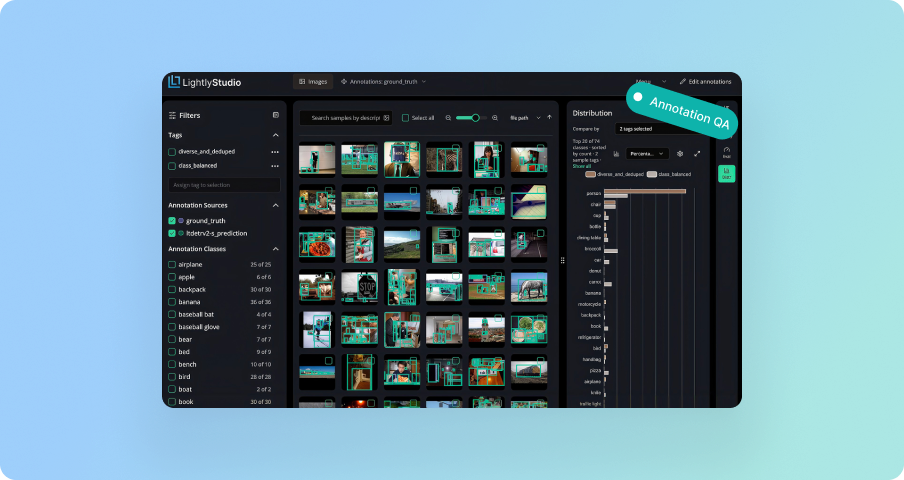
LightlyStudio 1.1.0 brings annotation QA and metadata-balanced sampling. Sort annotations by IoU to find where two sources disagree, and fix them with evaluations that flag themselves for recompute. New sampling can balance selections by metadata field or object diversity, and the distribution panel now compares multiple sample tags side by side.
Get Started with Lightly
Talk to Lightly’s computer vision team about your use case.
Thank you! Your submission has been received!
Oops! Something went wrong while submitting the form.
LightlyStudio 1.1.0 lets you sort annotations by IoU, so the boxes two sources disagree on come first. Fix one and the evaluation marks itself out of date, ready to rerun. Sampling can balance a selection over a metadata field, or pick images by how varied their objects are. And the distribution panel can compare any tag against the view you are in.
pip install --upgrade lightly-studio
Find the annotations your two sources disagree on
A dataset often carries two sets of annotations on the same images: ground truth and a model's predictions, or two annotators working the same batch. The boxes that need attention are the ones where the two disagree.
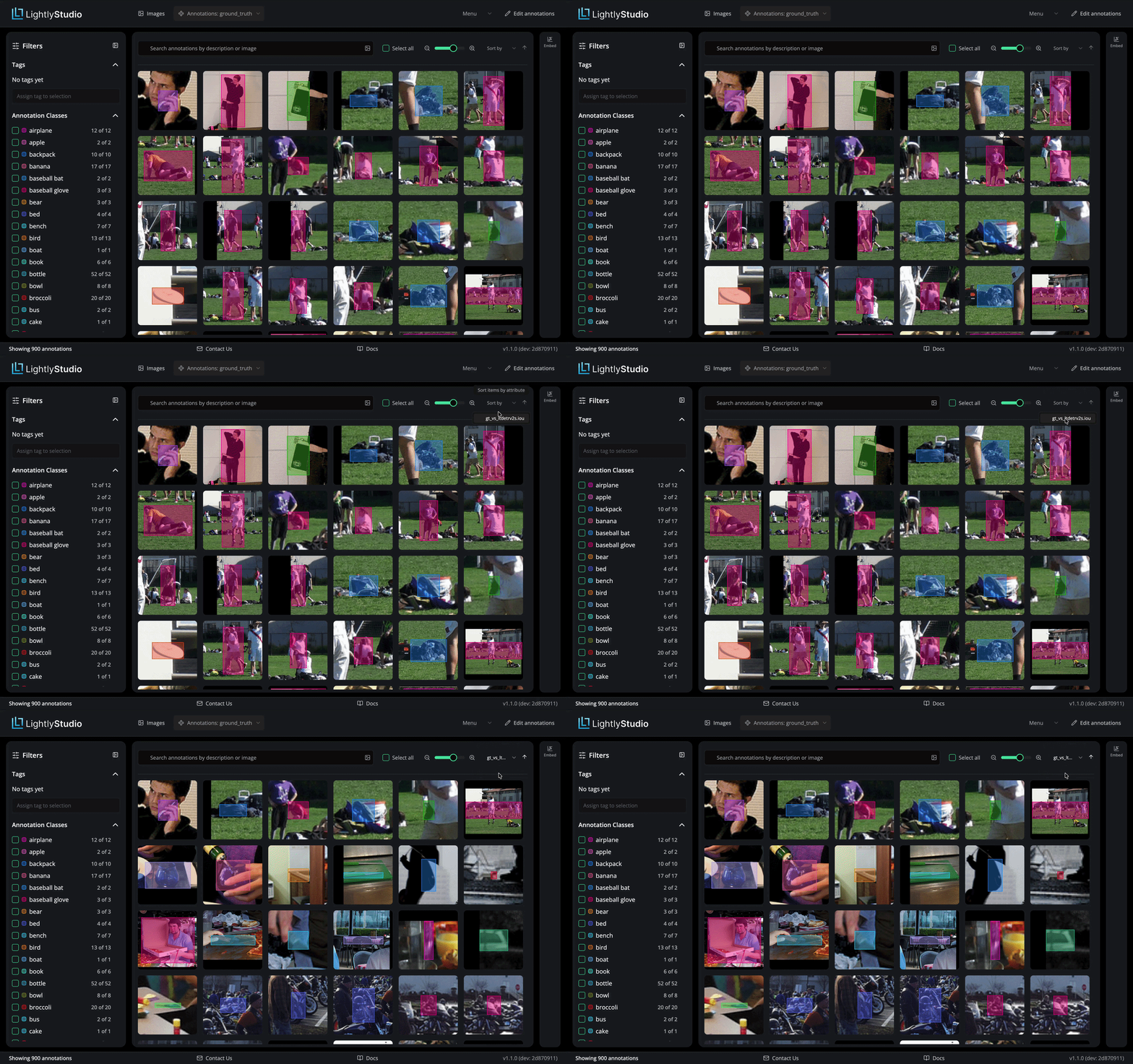
LightlyStudio 1.1.0 lets you sort the annotations grid by IoU. Boxes with no match in the other source score zero, so they sort to the top.
Everything below runs on the example dataset that ships with LightlyStudio. The script that sets it up is at the end of this section, and takes about ten seconds.
Which source you browse decides what you see. Browse the predictions and you get boxes the model added that ground truth has nothing for. Browse the ground truth and you get objects the model missed.
An unmatched box does not tell you who is wrong. The model may have invented it, or the annotation may be missing. The grid shows you the crop and both sources together, so you can decide.
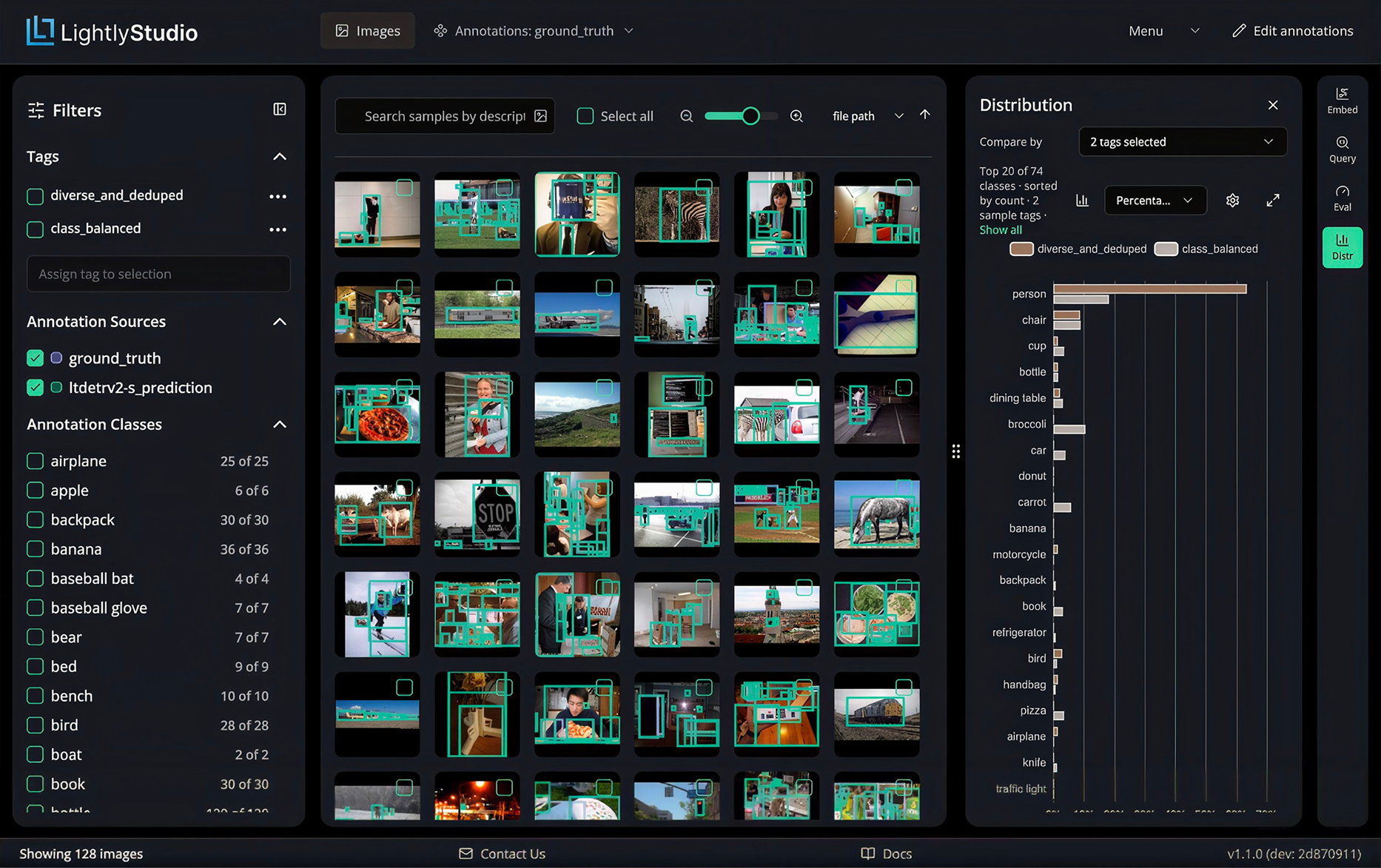
On the 128-image COCO subset that ships with LightlyStudio, LT-DETRv2-S draws 1,216 boxes against 900 ground-truth ones. 692 match. The remaining 732 require review, and sorting brings them to the front.
The confusion matrix provides a second route. Clicking a cell filters the grid to those annotations — the boxes one source called a person and the other did not label at all. Cmd+A then selects the filtered set, which can be tagged from the side panel.
Correcting a box marks the evaluation out of date. An amber icon and a Recompute button appear on the run. Recomputing preserves the run, so its history is kept.
Try it yourself
Save this as quality_loop.py and run it. It downloads the example images, loads the COCO ground truth, runs LT-DETRv2-S over the same images as a second annotation source, and creates the evaluation run behind everything above.
from PIL import Image
import lightly_studio as ls
import lightly_train
from lightly_studio.core.annotation import CreateObjectDetection
from lightly_studio.evaluation.image_dataset_evaluate import ObjectDetectionEvaluationConfig
dataset_path = ls.utils.download_example_dataset(download_dir="dataset_examples")
IMAGES = f"{dataset_path}/coco_subset_128_images/images"COCO_JSON = f"{dataset_path}/coco_subset_128_images/instances_train2017.json"PREDICTIONS = "ltdetrv2-s_prediction"ls.db_manager.connect(db_file="quality_loop.db", cleanup_existing=True)
dataset = ls.ImageDataset.create()
dataset.add_images_from_path(path=IMAGES)
dataset.add_annotations_from_coco(
annotations_json=COCO_JSON,
images_root=IMAGES,
annotation_source="ground_truth",
)
model = lightly_train.load_model("ltdetrv2-s-coco")
class_names = model.classes
for sample in dataset:
predictions = model.predict(Image.open(sample.file_path_abs).convert("RGB"), threshold=0.4)
annotations = [
CreateObjectDetection(
class_name=class_names[label],
x=int(x_min),
y=int(y_min),
width=int(x_max - x_min),
height=int(y_max - y_min),
confidence=score,
)
for (x_min, y_min, x_max, y_max), label, score in zip(
predictions["bboxes"].tolist(),
predictions["labels"].tolist(),
predictions["scores"].tolist(),
)
]
if annotations:
sample.add_annotations(annotations=annotations, annotation_source=PREDICTIONS)
dataset.evaluate().object_detection(
name="gt_vs_ltdetrv2s",
gt_annotation_source="ground_truth",
pred_annotation_source=PREDICTIONS,
config=ObjectDetectionEvaluationConfig(iou_threshold=0.5, classwise=True),
)
lightly-studio gui --db-file quality_loop.db
classwise=True matches boxes within each class, so a box with the wrong class counts as a disagreement. The script takes about ten seconds once the model and the data are cached.
See Lightly in Action
Curate and label data, fine-tune foundation models — all in one platform.
Few teams label everything. A few thousand images get picked out of a much larger pool, and that choice determines what the model learns. 1.1.0 adds two ways to make it.
Metadata balancing spreads the selection across the values of a metadata field. If your samples carry a weather field, you can ask for an even split across sunny, rainy and foggy, instead of the split your cameras happened to record.
target_distribution also takes "input", which mirrors the split you already have, or explicit ratios like {"sunny": 0.3, "rainy": 0.7}.
Object diversity picks images by how varied the objects inside them are, rather than how varied the whole scene is. Two photos of the same junction look different to a scene-level model but hold the same three cars. This one compares the crop of each annotation instead.
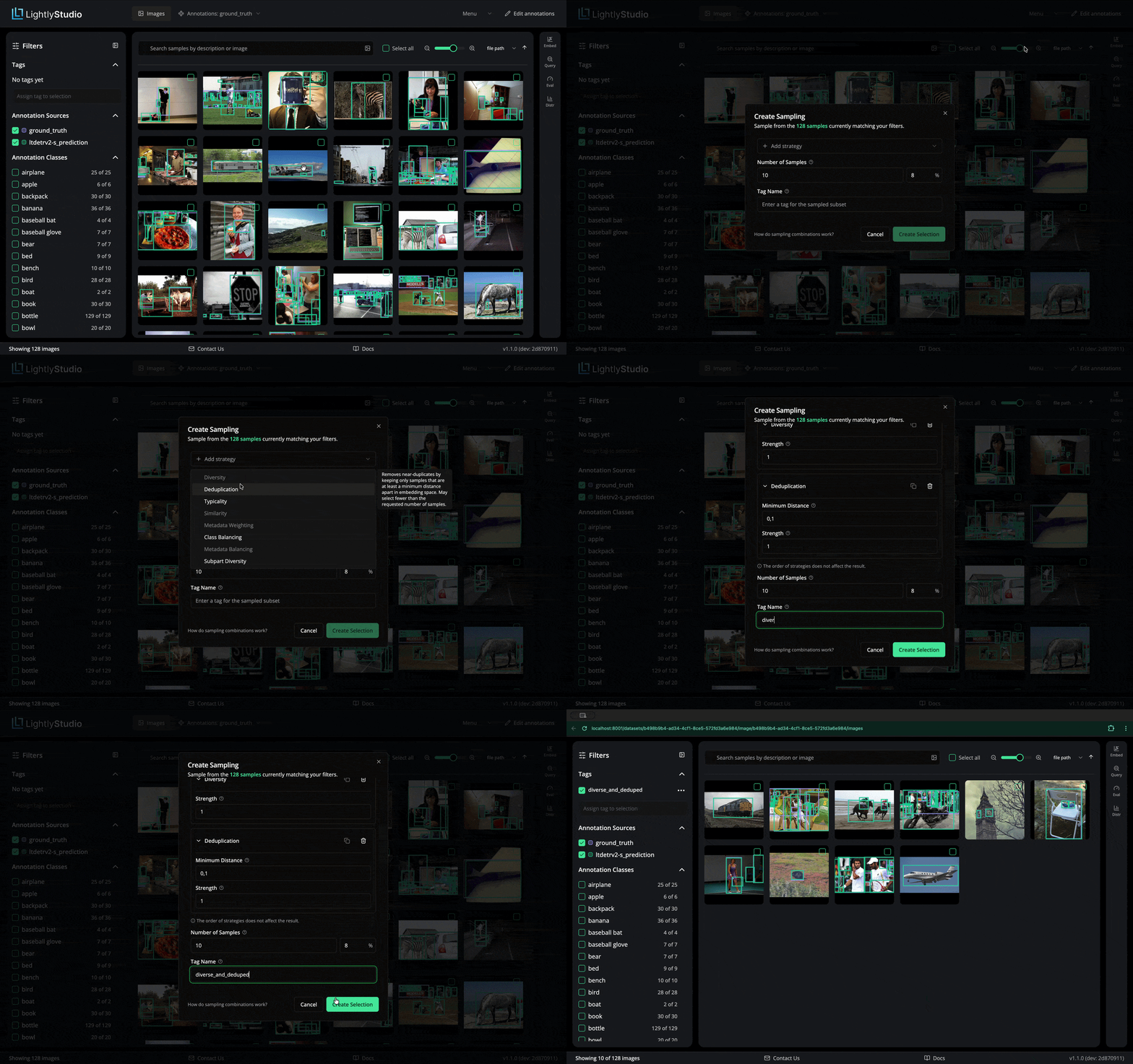
Both work from Python and in the sampling dialog in the browser.
The dialog stacks strategies. Add diversity, then class balancing, then a metadata field, and they run as one selection. You give it a count, or a percentage of whatever the grid is currently filtered to.
Compare distributions side by side
A selection is only useful if it has the composition you intended.
The distribution panel charts whatever the grid is showing - annotation classes, or any metadata field. In 1.1.0, sample tags can be added to that chart as additional series. Each tag gets its own bar next to the current view, so several selections can sit beside each other.
Adding a tag does not filter the grid; it only adds series to the chart. Categorical fields come out as grouped bars. Numeric ones come out as histograms sharing the same bins, so the shapes line up.
One control switches between counts and percentages. Counts tell you how many; percentages let you put a 50-image tag next to a 5,000-image one without the small set vanishing.
Categorical charts also carry aggregated "Other" and "Missing" bars, so a percentage is a share of everything in the set rather than of the values that happened to fit on screen.
The panel is on the images grid.
Also in this release
Been away a few versions? 1.0 shipped in June, and plenty landed between it and 1.1.0.
Object-level search. Every annotation gets its own embedding, so you can search boxes and masks by text or by image, or drag a crop straight into the search bar.
A query editor in the browser, for filters the sidebar cannot express — including annotation source and confidence.
Plugins take table input. A plugin can now accept a list of rows rather than one value at a time, which is what makes the SAM3 plugin worth using.
Tagging from the grid. Select everything matching the current filter, then create and assign a tag from the side panel.
More export formats: YOLO object detection, classification CSV, Pascal VOC segmentation, YouTube-VIS, COCO instance segmentation. An export covers whatever the grid is filtered to.
Bring your own embeddings. Load vectors you computed elsewhere and skip the model entirely.
Google Cloud Storage and Azure Blob in LightlyStudio Enterprise, alongside S3. Cloud indexing now sends its requests in parallel.
lightly-studio quickstart downloads an example dataset and opens the browser in one command.
Upgrading to 1.1.0
pip install --upgrade lightly-studio
1.1.0 changes how embedding models are stored in the database. Enterprise deployments on PostgreSQL migrate automatically. DuckDB databases, which covers every open-source installation, must be re-indexed. No automatic migration exists for DuckDB. Reconnecting with cleanup_existing=True deletes the database file, including tags, captions, evaluation runs and annotations created in the GUI. Export anything you need before upgrading:
Export annotations to COCO or YOLO.
Reconnect with cleanup_existing=True.
Add your images or videos again.
Re-import the exported annotations.
Three further changes in 1.1.0:
Classifiers exported by earlier versions no longer load. The LightlyEdge classifier export format has been removed.
The beta embedding-generator interface now requires embedding_space_spec in place of get_embedding_model_input.
LightlyStudio reports anonymous usage data on startup. Set LIGHTLY_STUDIO_ANALYTICS_ENABLED=false to disable it.
Upgrading from 0.4.x involves two earlier breaks as well: 0.4.12 changed the database schema, and 1.0.0rc1 renamed label to class_name, annotation collections to annotation sources, and selection to sampling.
What's next
Video is where most of the next stretch goes, followed by datasets that group several cameras on one scene. LightlyStudio is open source — if there is something you need, the issue tracker is the fastest way to tell us.
Get Started with Lightly
Talk to Lightly’s computer vision team about your use case.
Thank you! Your submission has been received!
Oops! Something went wrong while submitting the form.








.png)
.svg)