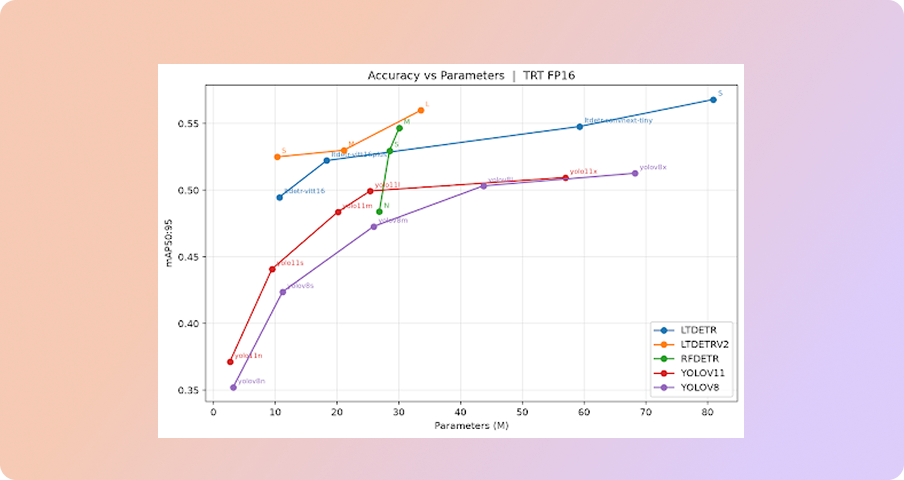
LightlyTrain 0.16.0 introduces LTDETRv2, a family of compact and real-time transformer-based detectors with architectural improvements from SOTA research, following our previous efforts in LTDETR to offer cutting-edge models for real-time object detection. LTDETRv2 comes in 4 sizes, all of which are designed for edge deployment for various compute budgets.
- ltdetrv2-s
- ltdetrv2-m
- ltdetrv2-l
- ltdetrv2-x
Our smallest detector (ltdetrv2-s-coco) with 10M parameters got 50.7 mAP on COCO dataset and 5.4ms in latency on an NVIDIA T4, achieving +1 mAP50:95 with 55% shorter training schedule with the same latency compared to the previous version.
Interactive examples are available on Google Colab: Object detection with LTDETRv2
Inference with DepthAnything for Depth Estimation
LightlyTrain 0.16.0 adds depth estimation inference for industries working on spatial perception. There we support both Depth Anything V3 and its predecessor V2, the SOTA for monocular depth. Both are built on the DINOv2 foundation model which LightlyTrain already has a strong ecosystem around it. Training support is on the way, stay tuned!
How does it work?
Load a model and call predict on an image. Hosted models download and cache automatically, and the result is a depth map at the original resolution.
import lightly_train

model = lightly_train.load_model("dinov2/dav3-relative-large")
depth = model.predict("image.jpg")
LightlyTrain supports both relative depth (closer vs. farther, no scale) and metric depth (absolute distance in meters), across Depth Anything V3 and V2. Batch inference is available via predict_batch.
Interactive examples are available on Google Colab: Depth estimation with DepthAnythingv3.
See Lightly in Action
Curate and label data, fine-tune foundation models — all in one platform.
Book a DemoDeploy your LT-DETR Models with Confidence through the Benchmark Command
Deploying object detection models requires navigating a series of tradeoffs, and the same questions arise each time. Which hardware should you target — CPU, GPU, or NPU? How do you balance inference speed against model size? And when moving from bf16 mixed-precision training down to fp16 for deployment, how much numerical accuracy do you actually lose?
The new benchmark command in LightlyTrain 0.16.0 addresses all of these at once. Point it at your exported training checkpoint, specify a backend between PyTorch, ONNX Runtime, and TensorRT, and see exactly how speed, size, and accuracy compare before committing to a deployment path.
Getting started takes only a few lines:
result = lightly_train.benchmark_object_detection(
	out="out/my_benchmark",
	dataset_name="coco128",  # Human-readable name shown in the report.
	model="out/my_experiment/exported_models/exported_best.pt",
	data="data/coco128.yaml",
)
result.print()
Run it, review the report, and select the backend and precision that fit your latency and footprint requirements. No more guesswork.
Inference with SAHI for EoMT Instance Segmentation
Following the Slicing Aided Hyper Inference (SAHI) inference support for LTDETR object detection in 0.14.0, LightlyTrain 0.16.0 now adds SAHI also to EoMT instance segmentation. This makes it possible to accurately segment small instances in high-resolution images that would otherwise be missed when the full image is downscaled to the model’s input resolution.
The example code below shows how to run SAHI inference with your model checkpoint
import lightly_train

model = lightly_train.load_model("dinov3/vitl16-eomt-inst-coco")
results = model.predict_sahi(image="image.jpg")
results["labels"]  # Class labels, tensor of shape (num_instances,)
results["masks"]   # Binary masks, tensor of shape (num_instances, height, width)
results["scores"]  # Confidence scores, tensor of shape (num_instances,)
You can tune the inference behavior via parameters:
- overlap controls the fraction of overlap between neighboring tiles (higher values improve small-instance recall at the cost of more computation);
- threshold sets the minimum confidence score to keep a prediction;
- nms_iou_threshold is the mask IoU threshold used for non-maximum suppression when merging tile predictions; and
- batch_size controls how many tiles are processed per forward pass (lower it to reduce peak memory usage).
Next steps



.png)







.svg)