LightlyTrain 0.14.0 introduces smaller and faster vision models, including PicoDet for real-time object detection, tiny DINOv3-based segmentation models, and FP16 ONNX/TensorRT export for edge deployment.
Get Started with Lightly
Talk to Lightly’s computer vision team about your use case.
Thank you! Your submission has been received!
Oops! Something went wrong while submitting the form.
LightlyTrain 0.14.0 comes with even smaller and faster models! It includes a preview of the PicoDet object detection models, tiny DINOv3-based models for all segmentation tasks, and ONNX/TensorRT export with FP16 precision support for all our model variants. With this update we want to make it even simpler to train and deploy real-time models for applications running on edge devices.
Preview: PicoDet Models
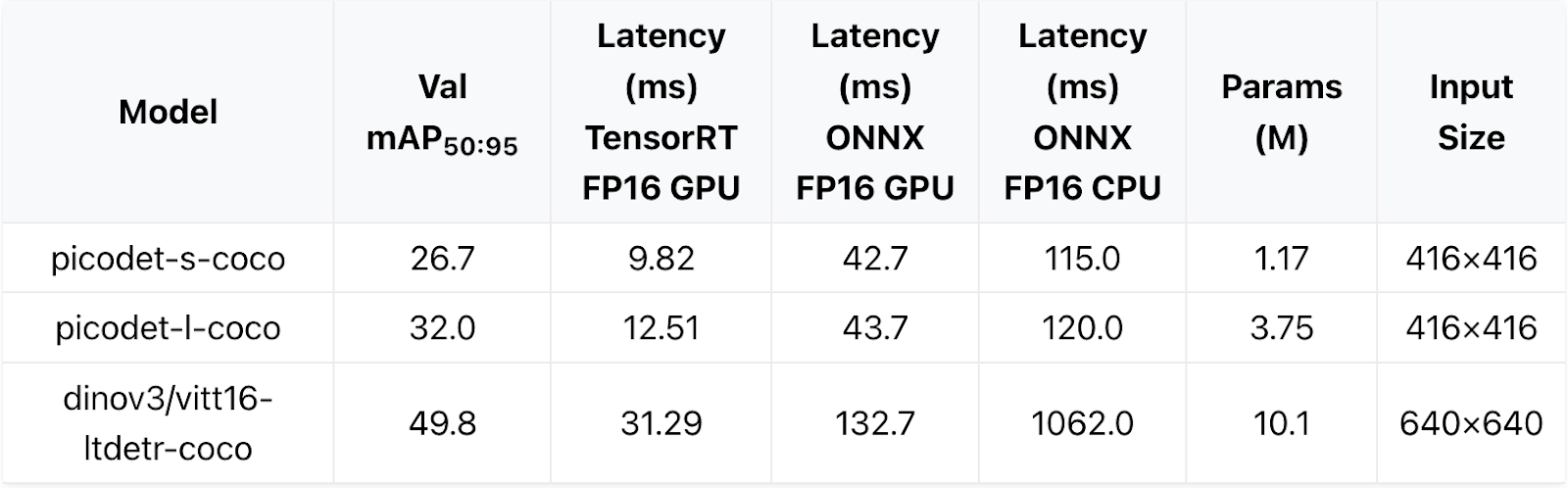
PicoDet object detection models are optimized for real-time inference on highly resource constrained devices. Based on a convolutional architecture, they also run on older hardware and in real-time on CPU. Compared to our DINOv3-based LTDETR models they have 10x fewer parameters and are more than 2x faster.
Table: Model performance on COCO validation set. Hardware is a Jetson Orin Nano 8GB (not super version) with Jetpack 6.2, batch size of 1, Python 3.10, TensorRT 10.3 and onnxruntime 1.20.
After LightlyTrain 0.13 introduced tiny DINOv3-based object detection models, we went one step further in LightlyTrain 0.14 and added tiny models for all segmentation tasks: instance, semantic, and panoptic segmentation. The tiny models achieve 2x higher speed with 3x fewer parameters compared to the small model variants.
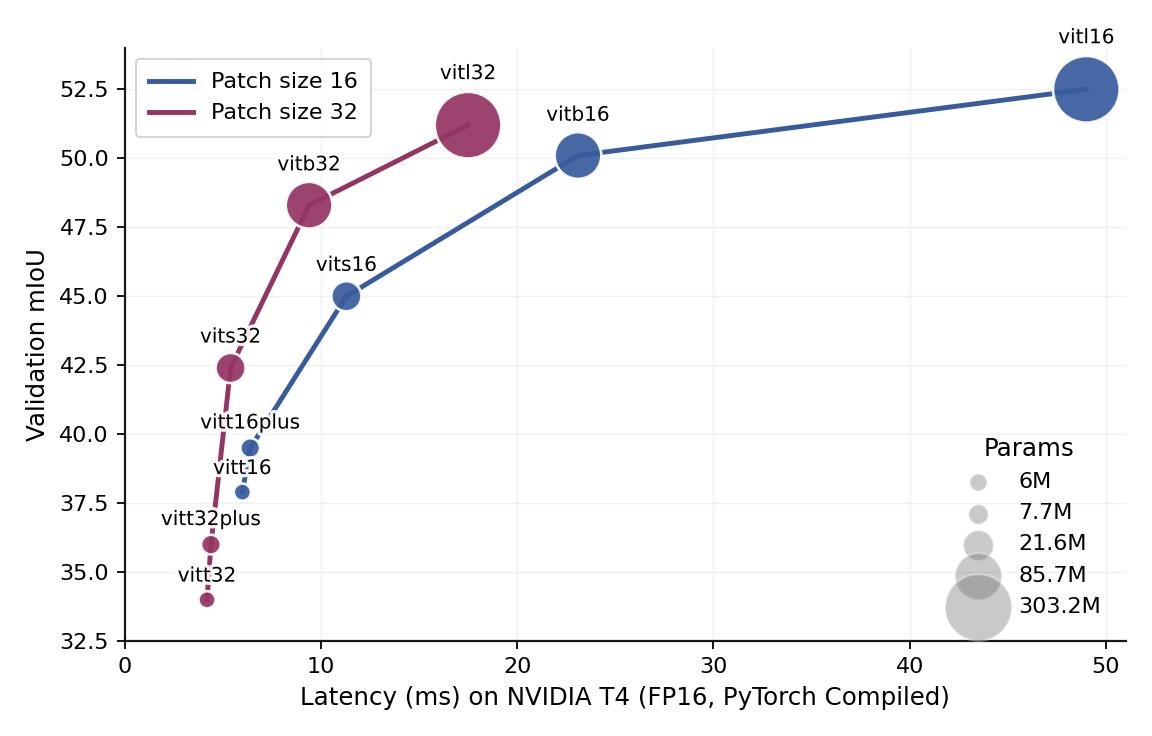
On top of tinier models, LightlyTrain 0.14 also introduces models with variable patch sizes. Running a model at a larger patch size reduces the number of computations significantly and improves the segmentation performance for a fixed latency budget as shown in the image below. This makes it possible to run a small semantic segmentation model (vits32) with 21.6M parameters at a higher speed than a tiny model (vitt16) with 6M parameters while maintaining a 5 percentage points higher mIoU score.
Image: Semantic segmentation performance on the COCO validation set.
ONNX and TensorRT Export
Next to tinier and faster models, we also release ONNX and TensorRT export for all models. This makes it possible to deploy the models on a wide range of different hardware platforms. All models can be exported with FP16 precision (half-precision) which reduces the memory required to load the model for inference and results in up to 2x higher inference speed.
The example code below shows how to train a PicoDet object detection model and export it to ONNX and TensorRT.
import lightly_train

if __name__ == "__main__":
    # Train
    lightly_train.train_object_detection(
        out="out/my_experiment",
        model="picodet/s-416-coco",
        data={
            "path": "base_path_to_your_dataset",
            "train": "images/train",
            "val": "images/val",
            "names": {
                0: "person",
                1: "bicycle",
                # ...
            },
        }
    )

    # Load model after training
    model = lightly_train.load_model("out/my_experiment/exported_models/exported_last.pt")
    # Or load one of the models provided by LightlyTrain:
    # model = lightly_train.load_model("picodet/s-416-coco")

    # Export to ONNX
    model.export_onnx(
"model.onnx",
precision="fp16", # Enable FP16 precision for faster inference
    )

    # Export to TensorRT
    model.export_tensorrt(
"model.trt",
precision="fp16", # Enable FP16 precision for faster inference
    )
Interactive examples are available on Google Colab:



.png)






.png)
.svg)